![spaceboxlogo_cn+eng(horizontal)_white.png]](https://26606692.hs-sites-eu1.com/hs-fs/hubfs/spaceboxlogo_cn+eng(horizontal)_white.png?height=40&name=spaceboxlogo_cn+eng(horizontal)_white.png)
To reset your password, simply follow these steps:
| 1. In the Sign In screen, tap "Forgot Password" | 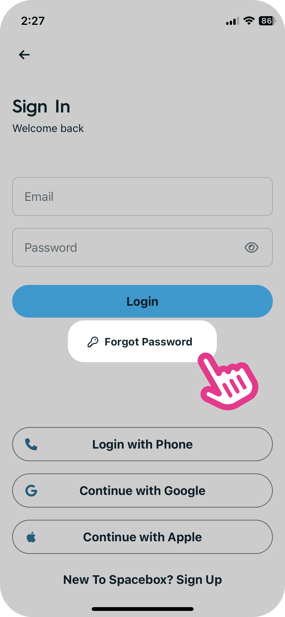 |
|||||
| 2. Enter your registered email and tap "Submit" | 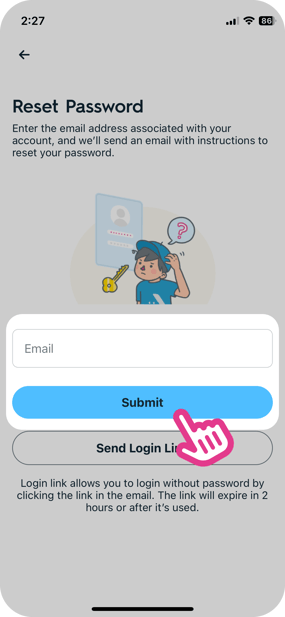 |
|||||
| 3. A reset email will be sent to your inbox. Tap "Reset Password" to continue on our mobile app | 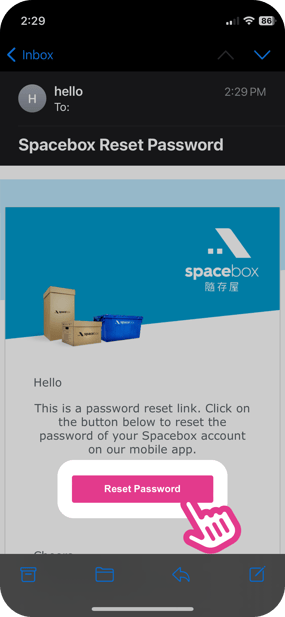 |
|||||
| 4. In the Create New Password screen, enter your desired new password and tap "Save" | 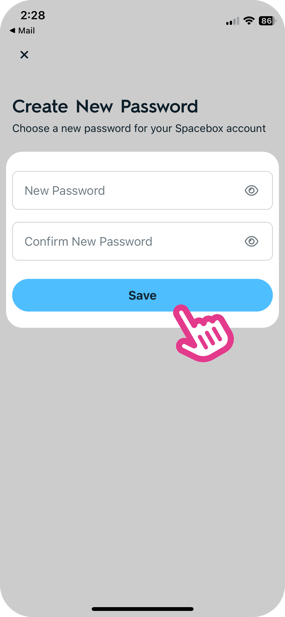 |
|||||
| 5. You have successfully reset your password! You can now sign in with your email and the new password | 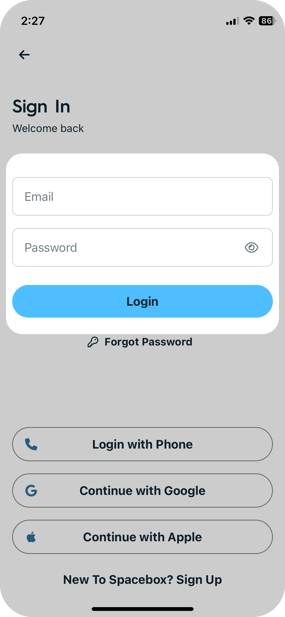 |
|||||